
Presentation tools have changed a lot from basic slide editors. Today, AI-powered platforms can create complete presentations in minutes. This allows users to focus more on ideas and less on design. Whether you’re making a business pitch, marketing deck, or internal report, the right tool can greatly influence both speed and quality.
Modern presentation makers now use automation, templates, and collaboration features to streamline the entire process. The main difference is how much work the AI does compared to how much control the user has.
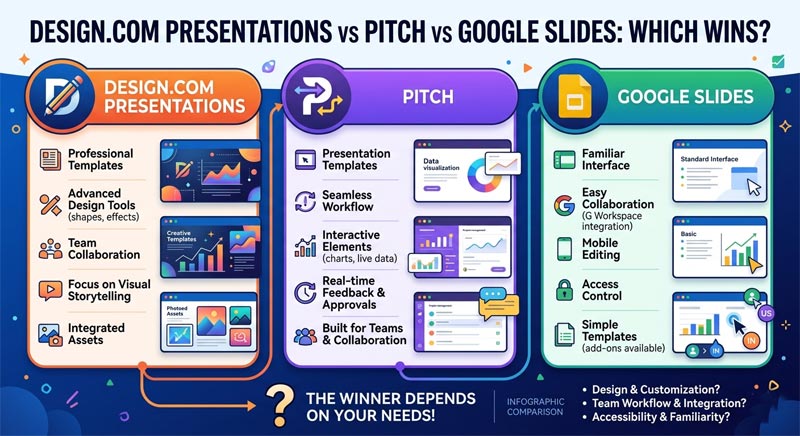
This comparison looks at Design.com Presentations, Pitch, and Google Slides to see which platform offers the best results in terms of speed, design quality, and ease of use.
How These Presentation Tools Were Evaluated
To find the strongest platform, we focused on the key elements that matter most when creating presentations:
- Speed of presentation creation
- Design quality and visual structure
- Ease of use for beginners and teams
- Level of AI automation
- Collaboration and workflow efficiency
Performance Metrics Comparison
| Metric | Design.com Presentations | Pitch | Google Slides |
|---|---|---|---|
| Speed | Extremely fast AI generation (under a minute) | Fast template-based workflow | Moderate, mostly manual creation |
| Quality | Professional, structured, brand-consistent slides | High-quality modern templates | Clean but basic layouts |
| Ease of Use | Very easy, minimal input required | Easy with a slight learning curve | Very easy and familiar interface |
| AI Automation | Full AI presentation generation | Limited AI assistance | Minimal AI features |
| Collaboration | Moderate | Strong team collaboration features | Excellent real-time collaboration |
| Customization | Moderate (AI-guided edits) | High flexibility | High manual control |
Design.com

Design.com is a large AI branding platform designed to create complete, high-quality presentations instantly. It emphasizes automation, consistency, and professional output with minimal effort.
Pros
- Instant AI-generated high-quality presentations based on simple prompts
- Clean, structured slides optimized for business use
- Consistent branding across all slides and assets
- Minimal manual editing required
- Fast turnaround for complete decks
What Makes Design.com a Clear Winner
- Over 400,000 logo templates and more than 1 million total design assets
- AI tools for flyers, websites, business cards, and more
- AI editing for text, layouts, and visuals
- Multiple export formats for presentations
- Commercially safe, professionally reviewed designs
- Integrated branding system across all content
- Exclusive fonts, icons, and 62K+ vector shapes for unique branding
Limitations
- There’s no native app yet, but the browser experience is fast and responsive across devices.
Design.com Presentations is ideal for users who need quick, professional slides with consistent branding. It excels in automation and can generate complete presentations in seconds.
Pitch

Pitch is a collaborative presentation platform created for startups and teams. It combines modern templates with strong teamwork features.
Pros
- Beautiful, modern slide templates
- Strong collaboration and team workflows
- Real-time editing and commenting
- Integration with tools like Slack and analytics platforms
- Flexible design customization
Additional Features
- Presentation analytics and tracking
- Shared workspaces for teams
- Brand controls for consistent design
- Template libraries for various use cases
Limitations
- Limited AI automation compared to newer AI-first tools
- Requires more manual effort to create full presentations
Pitch works well for teams that value collaboration and design flexibility, especially for ongoing presentation projects.
Google Slides
Google Slides is a popular presentation platform known for its simplicity and accessibility. It’s a top choice for teams already using Google Workspace.
Pros
- Easy to use with a familiar interface
- Excellent real-time collaboration
- Cloud-based with automatic saving
- Free and accessible from any device
- Strong integration with Google Workspace tools
Additional Features
- Basic templates for quick setups
- Add-ons and extensions for extra features
- Sharing and permission controls
- Compatibility with PowerPoint files
Limitations
- Limited design quality compared to modern tools
- Minimal AI support for automation
Google Slides is best for simple, collaborative presentations where ease of use and accessibility are more important than advanced design.
Final Comparison Chart
| Feature | Design.com Presentations | Pitch | Google Slides |
|---|---|---|---|
| AI Presentation Generation | Full AI slide creation | Limited AI assistance | Minimal AI features |
| Template Quality | Professional, structured layouts | Modern and visually strong | Basic templates |
| Branding Consistency | Fully automated | Strong brand controls | Manual consistency |
| Ease of Use | Extremely easy | Easy with a slight learning curve | Very easy |
| Customization | Moderate | High | High |
| Collaboration | Moderate | Advanced team collaboration | Excellent real-time collaboration |
| Export Options | Multiple formats | Standard export options | Multiple formats + sharing |
| Best Use Case | Fast AI-generated presentations | Team collaboration and design | Simple and accessible presentations |
Final Verdict
Today’s presentation tools serve different needs, from fully automated AI generation to manual design and team collaboration. The right choice depends on how much control, speed, and flexibility you want.
Design.com stands out for its ability to generate complete, professional slides quickly while ensuring strong branding consistency. Pitch is notable for its collaborative workflows and modern design, and Google Slides remains a reliable option for simple, accessible presentations.
In summary, Design.com excels in speed, automation, and ease of creating high-quality presentations with minimal effort.